CloudStream APK
(Ratings): 4.8+ ★★★★★
(App information Official 2026)
| App Name | CloudStream APK |
| APK Version | V4.8.0 |
| APK Size | 68.7 MB |
| Category | Downloads |
| Price | on Free |
CloudStream APK is an open-source media center for streaming and downloading media. It has a user-friendly interface.
CloudStream
CloudStream is an open-source media center designed around streaming and downloading media. Unlike a conventional streaming application that comes with its own fixed catalogue, it uses an extension-based system. This means the main application provides the media centre interface and playback functionality, while extensions add individual content sources and services. The app is an extension-based multimedia player focused on flexibility and customization. Its official repository also states that the application itself does not provide video sources by default; extensions must be installed to add that functionality. Instead of putting every source directly inside the main application, it separates the core player from the extensions that provide content. It is primarily an Android application, but the project also provides information for using it on Android TV, Windows, and Linux. It includes features such as bookmarks, Chromecast support, phone and TV support, an extension system, and an ad-free experience.
What is CloudStream APK?
CloudStream APK is the Android package version of this application, an open-source media-center application for streaming and downloading media. The project is published under the GPL-3.0 license, and its official repository identifies it as an Android application for streaming and downloading media. The main idea behind this application is flexibility. Rather than functioning as a single content provider, it gives users a media-center environment that can work with different extensions. This distinction is important because the app does not automatically contain a complete collection of videos when it is first installed. The official project specifically warns that the application does not provide video sources by default and that extensions are needed to add functionality. Once appropriate extensions are configured, users can use it to search for available media, open titles, play compatible streams, save bookmarks, and download supported media.
How Does CloudStream App Work?
CloudStream Extensions work through three main components:
- Main application
- Extensions
- Media playback
The main application provides the interface and media-center functionality. Extensions connect it with particular sources. After an extension has been installed and configured, it can provide information and playable sources that the app can process. The official repository lists examples of extensions associated with sources such as LibreVox, YouTube, Twitch, IPTV-org, and nginx, while also noting that there are additional possibilities.
This extension-based approach keeps the core application separate from individual sources.
Main Application
The main CloudStream App acts as the central media interface. It handles the general user experience, browsing, playback-related functions, bookmarks, downloads, and other media-center features.
Extensions
Extensions add source-specific functionality. Without extensions, the application does not automatically provide video sources.
Media Playback
After an extension provides a compatible media source, it can process it through its media-player functionality. This allows users to watch or listen to supported content without requiring every source to be built directly into the core application.
CloudStream Features
CloudStream latest version Download contains several features that define how the application works. The following sections explain its main capabilities in detail.
Ad-Free Experience
One of the features specifically listed by the CloudStream Discord is an ad-free experience. The official repository describes it as having no ads whatsoever. This means the application itself is designed without conventional advertising interruptions inside its core interface. The absence of advertisements can make navigation feel cleaner, particularly when users are browsing through media, opening titles, or managing their personal library.
No Tracking or Analytics
This is part of the project’s approach to giving users a more controlled media-center experience. Instead of building the application around advertising or analytics systems, it focuses on its core purpose: managing media sources, playback, downloads, bookmarks, and extensions. Users should still understand that extensions are separate components. The official project specifically distinguishes the main application from third-party extensions, so the behaviour of an extension should not automatically be assumed to represent the behaviour of the application itself.
Extension System
CloudStream github is not designed as a traditional streaming service with one permanently fixed catalogue. Extensions allow the application to connect with different sources. This system provides flexibility because developers can build integrations for different services without changing the basic purpose of the main application. The project also provides documentation for extension developers, showing that extensions are an important part of the app ecosystem. Therefore, users should pay attention to which extensions they install and what sources those extensions connect to.
Bookmarks
The app includes bookmarks as one of its built-in features. Bookmarks make it easier to keep track of media that a user wants to return to later. Instead of searching for the same title repeatedly, users can use the bookmark functionality to organize their preferred or currently followed content. This is particularly useful when the app is being used as a personal media center with multiple sources and extensions.
Phone Support
CloudStream iOS is designed to work on phones as part of its Android-focused application. The official feature list explicitly mentions phone support. The mobile interface allows users to browse available media, configure extensions, manage bookmarks, play supported content, and use download functionality from a compatible Android device. Because this application is an open-source project, its development can also evolve as contributors improve the application and address issues.
TV Support
The application also supports television-oriented setups. The official project specifically lists TV support and provides setup documentation for Android TV. It also provides information for other platforms, including Windows and Linux. TV support is useful for users who want to use it as a larger-screen media center rather than restricting the application to a smartphone. The exact setup can differ depending on the device, operating system, and installation method.
Chromecast Support
CloudStream Web allows compatible users to send supported playback from their device to a compatible Chromecast environment. For people who prefer browsing on a phone but watching on a larger screen, this can make the overall experience more convenient. Chromecast functionality can depend on device compatibility and the particular playback environment, so users should ensure that their devices are configured correctly.
Media Downloads
It is an application for streaming and downloading media. The download functionality gives users another way to handle compatible media instead of relying exclusively on continuous streaming. The actual availability of downloadable content can depend on the source and extension being used. The core application does not automatically provide every media source, so users should not expect identical download functionality across every extension.
Flexible Media Center
The app is designed as a media center rather than a single-purpose video application. Its features work together to create a central place for managing supported media sources. Extensions provide source connectivity, while the main application handles the broader media experience. This design also means that Cloudstream reddit can evolve independently from individual sources.
CloudStream User Interface
Its interface is designed around media discovery and playback rather than social networking or advertising.
Home Interface
The home area provides the central point for interacting with available content and configured sources. Because CloudStream repository uses extensions, the information available in the interface can depend on which extensions have been installed.
Search and Browsing
Search and browsing are important when working with multiple media sources. Once appropriate extensions are available, users can discover content supplied through those integrations. The exact titles and categories shown are therefore dependent on the configured sources rather than being a fixed application-owned catalogue.
Media Details
When supported information is available, users can open media entries and view their associated details before starting playback. This provides a more organized experience than simply opening individual streaming links through a browser.
Bookmarks Area
The bookmark functionality of CloudStream Discord provides a convenient location for returning to saved media. Users can use bookmarks to keep track of titles they want to revisit without repeatedly searching through available sources.
Bookmarks Area
CloudStream Extensions Explained
Extensions deserve special attention because they are fundamental to how it operates. An extension can be thought of as a connector between the app and an external media source. The main application supplies the media-center environment, while an extension supplies additional source-specific functionality. CloudStream Beta APK gives examples including LibreVox, YouTube, Twitch, IPTV-org, and nginx. However, not every extension should automatically be considered an official application component. The project explicitly states that recommended sources and extensions are not officially moderated or endorsed by the app. For this reason, users should consider the source and purpose of an extension before installing it.
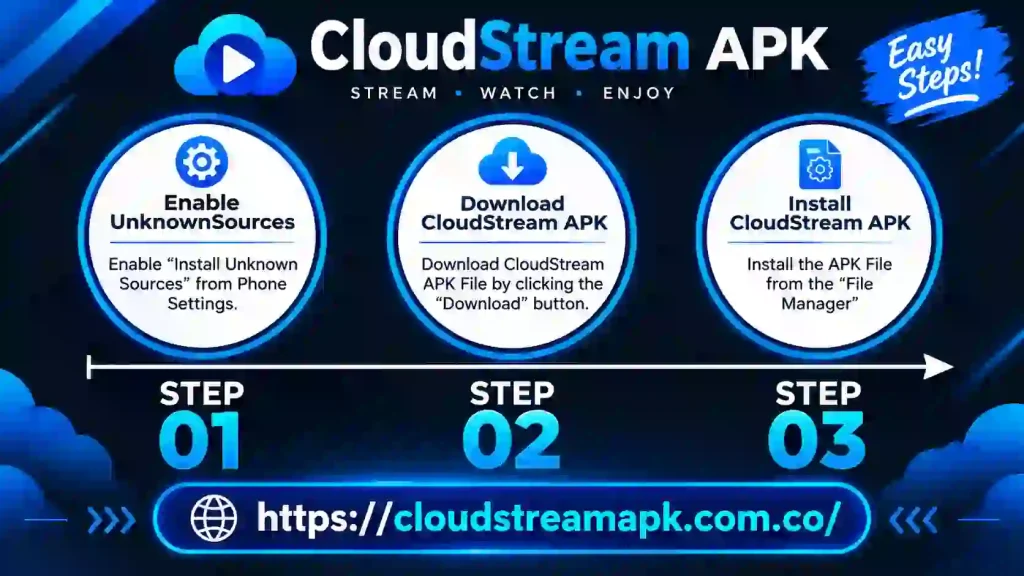
How to Download CloudStream APK
Installing Cloud Stream APK Android TV on Android generally involves obtaining the application package from a trusted project source and completing the Android installation process.
Obtain the CloudStream APK
Download CloudStream Remix from the project’s official release or distribution source. Avoid downloading modified packages from unknown websites because it can be difficult to determine whether an unofficial APK has been altered.
Allow APK Installation
If Android blocks the installation, the device may require permission to install applications from the source being used. The exact location of this setting can vary according to the Android version and device manufacturer.
Install the Application
Open the downloaded APK file and follow Android’s installation prompts. Wait until the installation process finishes before launching the application.
Open CloudStream
Launch the app from the application menu. At this point, the core application can be configured according to your preferred setup.
Configure Extensions
Remember that the app does not provide video sources by default. The official project states that extensions must be installed to add functionality. Install only extensions that you understand and trust, and consider the copyright status of the sources they provide.
How to Use CloudStream
Using this application becomes straightforward once the application and required extensions have been configured.
CloudStream on Android TV
CloudStream Android TV provides dedicated Android TV setup information, making it possible to use the application as part of a television-based media environment. A TV setup can be useful for users who prefer a larger display and remote-friendly media experience. The installation process can vary depending on the Android TV device, so users should follow the project’s current setup instructions for their particular environment.
CloudStream on Windows
CloudStream for PC also provides documentation for Windows setups. This is useful for people who want to use the app ecosystem beyond a conventional Android phone. Windows support should be configured according to the project’s current documentation because desktop installation and Android APK installation are not necessarily identical processes.
CloudStream on Linux
CloudStream Beta project documentation also includes information for Linux. Linux users should follow the project’s current instructions for their particular distribution and supported setup. This broader platform documentation reflects its goal of functioning as a flexible media-center project rather than being limited to one type of device.
CloudStream Downloads
CloudStream Apple can download supported media, which is one of the capabilities identified in the official project description. However, download availability should not be confused with guaranteed downloading from every extension. An extension determines the source and functionality it provides. Therefore, one source may expose downloadable media while another may only provide streaming. Users should also make sure that downloaded content is stored in an appropriate location and that there is enough available storage on the device.
Advantages of CloudStream
- Cloud Stream is an open-source project published under the GPL-3.0 license.
- The official feature list states that the app contains no ads.
- The project identifies the absence of tracking and analytics as one of its features.
- The extension architecture provides flexibility by separating the main application from individual content sources.
- Users can save media for easier access later.
- Chromecast support allows compatible users to move playback to a supported larger-screen environment.
- It supports both phone-oriented and TV-oriented usage.
- The project describes it as supporting both streaming and downloading media.
Disadvantages of CloudStream
- The biggest point new users need to understand is that it does not provide video sources by default. Extensions are required.
- Because extensions are separate from the core application, their availability and behaviour can differ.
- Users who expect a traditional streaming app with an immediately available catalogue may need additional configuration before it becomes useful.
- Because the app relies on extensions and external sources, a source may change or become unavailable without the core application itself being responsible for that change.
- The recommended extensions and sources are not officially moderated or endorsed by the project.
Common CloudStream Problems and Solutions
App Shows No Content
If the application does not display useful media sources, check whether an appropriate extension has been installed. It’s official documentation makes clear that the application does not include video sources by default.
An Extension is Not Working
An extension can stop functioning because of changes affecting the external source it connects to. Check the extension’s current status and make sure you are using a compatible version.
Video Will Not Play
Playback problems can be related to the source, extension, device, internet connection, or media format. Try another available source if one is provided, and check whether the issue affects only one title or multiple titles.
Downloads Are Not Working
Download functionality depends on the source and extension. If one title cannot be downloaded, that does not necessarily mean its entire download system is unavailable.
CloudStream is Not Installing
Check that the APK is compatible with the device and that Android permits installation from the source where the package was obtained.
Chromecast is Not Working
Check that the phone and Chromecast-compatible device are properly connected and available on the same network where required by the casting setup.
Is CloudStream Safe to Use?
CloudStream Movie itself is an open-source project, and its official repository provides its source code and project information. It also states that the application is ad-free and does not use tracking or analytics. However, users should distinguish the main application from third-party extensions. The project’s own documentation explains that extensions are developed separately and that recommended extensions and sources are not officially moderated or endorsed by it. For that reason, users should obtain the main application from a trustworthy project source and carefully consider any extension before installing it.
Is CloudStream Safe to Use?
CloudStream Movie itself is an open-source project, and its official repository provides its source code and project information. It also states that the application is ad-free and does not use tracking or analytics. However, users should distinguish the main application from third-party extensions. The project’s own documentation explains that extensions are developed separately and that recommended extensions and sources are not officially moderated or endorsed by it. For that reason, users should obtain the main application from a trustworthy project source and carefully consider any extension before installing it.
Copyright and CloudStream
Its official project specifically asks developers not to create illegal extensions or extensions that host copyrighted media without authorization. The project also explains that third-party extensions are developed by unrelated developers and are outside the direct control of the project. Therefore, users should consider the copyright laws applicable in their country and use it and its extensions only for content they are legally permitted to access.
Why Use CloudStream?
CloudStream APK download is primarily designed for users who want a flexible media-center application rather than a conventional streaming service with one fixed catalogue. Its extension architecture allows the core application to remain separate from individual sources. The combination of streaming, downloading, bookmarks, Chromecast, phone and TV support, and extension-based customization gives users several ways to organize their media experience. The most important thing to understand is that its flexibility comes from its extension system. The application itself is the central platform; extensions determine which additional sources and functions become available.
CloudStream vs Traditional Streaming Apps
CloudStream old version operates differently from a conventional streaming platform. A traditional streaming service normally controls its catalogue directly and provides the content through its own application. The app instead provides the media-center environment and allows extensions to connect it with different sources. This means it offers more flexibility in how sources are integrated, but it also means that users have additional setup responsibilities. The extension system is therefore not an optional detail. It is central to understanding how it works.
Frequently Asked Questions
Conclusion
CloudStream is an open-source media-center application built around flexibility, streaming, downloading, and extensions. Instead of maintaining one fixed content catalogue, it provides a central platform where extensions can add different media sources. Its core feature set includes an ad-free experience, no tracking or analytics, bookmarks, Chromecast support, phone and TV compatibility, downloading, and an extension system for customization. The extension model is the most important part of the application. The app itself does not provide video sources by default, so users need suitable extensions to make use of source-based media functionality. For users who understand this setup, it can serve as a flexible media center across supported devices. At the same time, extensions should be selected carefully because the project does not officially moderate or endorse every third-party extension or source.